
Updated: November 16, 2014
RGB
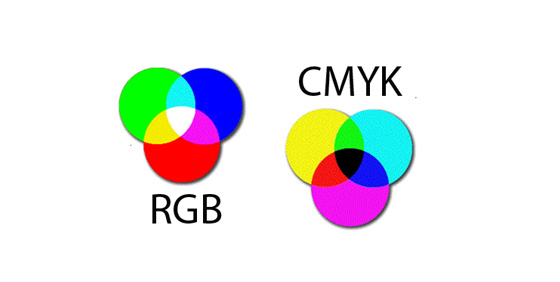
Both RGB and CMYK represent abbreviations of two types of color systems. The main difference between RGB and CMYK is that the first one is used for digital appearance and the second one is representative for the print world.
RGB, or RED GREEN BLUE – represents that color space used for computer monitors, video systems, TV, mobile phones, etc. The RGB color system consists of: 100%Red+100%Green+100%Blue= White. There is no room for black.
RGB’s attributes:
– additive colors;
– vibrant tones;
– 3 channels: red, green, blue.
– smaller files sizes.
CMYK
The CMYK color system stands for CYAN, MAGENTA, YELLOW and K is for BLACK. By combining 100%Cyan+100%Magenta+100%Yellow= a Black that is not 100% pure Black, but a dark gray. By adding the K (Black) to the color system, the result will be a perfect Black, just like in RGB’s case, when the result of the three colors combination is 100% white.
CMYK’s attributes:
– subtractive colors;
– cool tones;
– only way for print media
– 4 channels: cyan, magenta, yellow, black.
Differences
So, if anyone starts a design in color and intends to keep it in the digital world, it’s ok to use the RGB mode, no matter what program you use, Photoshop, Adobe Illustrator, Corel Draw or Quark Express.
But, if your work is for printing purposes, the best way is to convert it to CMYK mode first, to take a look at the way it will show on paper. Anyway, it’s impossible to obtain a perfect match between an image that you see on a computer monitor (for instance) and the same image on print. In this case, there are some points to take into consideration that can affect the colors of the image on the paper: the way the monitor settings are made, the paper’s quality, its white degree, if it’s shiny or flat. Even if it’s impossible, you can obtain the closest match to the screen as possible by changing/converting the file mode to CMYK. Here are two examples for Photoshop and Adobe Illustrator.
Adobe Photoshop
If the file already exists select the following menu options: Image > Mode > CMYK.
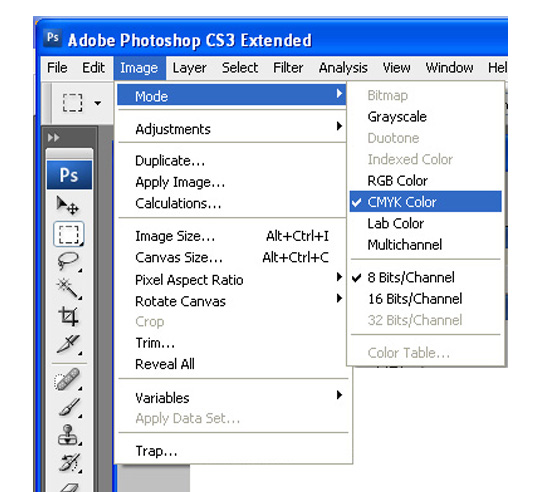
When starting a new file select CMYK for the mode before clicking OK.

Adobe Illustrator
For an existing file select Edit > Select All and then Filter > Colors > Convert to CMYK.

For a new file, select File > New and select CMYK color for the Color Mode.

Very usefully information , at least for the beginners and you could include also some info about use of the Pantone color chart since many of your customers use your clipart for screen printing.
nice information
thank you ;]
Great detailed information, I ll be visiting you more frequently, here is very interesting information.
Online clothing
It is a good info. I really enjoy this post. We’re all waiting for your next article of course.
Online bags
thanks so much
(
nice information)
gud
what’s up, just wanted to say this is very homely writing! And in order to share my gratitude I’ll show off this youtube vid I found earlier, has free Brazzers videos in the account!
A great article on both colour schemes.
Thanks for the very explainable idea that you post here at your blog. More power and God-bless…..!
It’s nice and really good information.
THANKS FOR UR VALUABLE INFORMATION
I amend and approve digital artwork for t-shirt screen printing, and I find sometimes confusion crops up between CMYK and RGB colour modes. Here’s a post I created for my customers so they’re able to understand how these colours modes can effect their print outcome 🙂
bit.ly/VuTajf